VS Comparison
Akai MPC Renaissance vs MPC Studio: what's actually different
Both units shipped in 2012 as the "hybrid" MPC line: pads and a hardware control surface bolted to a computer running MPC Software, not a standalone box like anything else in this site's buying-guide family. The similar name and shared pad layout hide a bigger split than the spec sheets suggest: one is a full audio interface with a dedicated hardware Vintage Mode circuit, the other is a MIDI controller with no audio path at all. Every claim below is checked directly against Akai's own combined MPC Renaissance / MPC Studio User Guide.
The short version
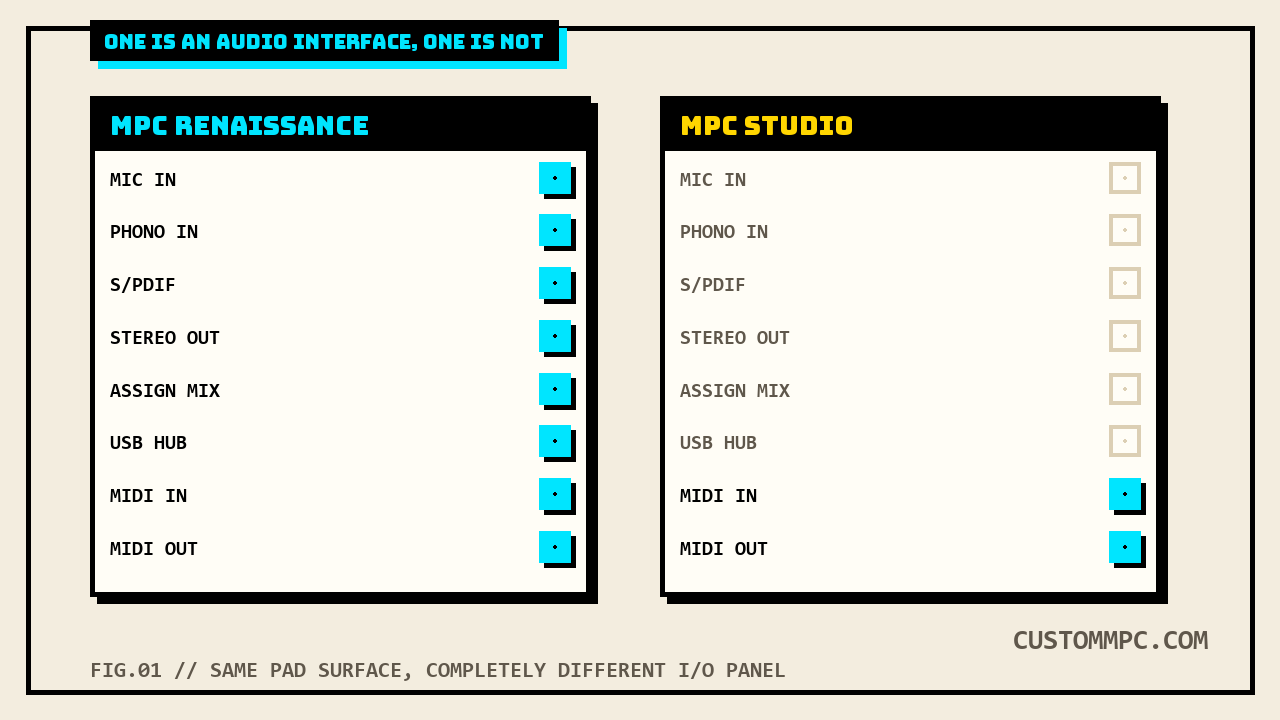
MPC Renaissance and MPC Studio share the same 2012-era hybrid concept, pads and hardware controls talking to MPC Software on a connected computer, and the same core workflow buttons: Full Level, 16 Level, Note Repeat, the same transport section, the same 16 Q-Link Knobs. The real difference is everything wired to the back panel. Renaissance is a complete audio interface, Mic and Phono inputs with phantom power, S/PDIF, two separate stereo output pairs, a powered USB 2.0 hub, and a dedicated hardware Vintage Mode button that emulates the MPC3000 and MPC60's analog character. Studio has none of that. Its entire Power and I/O section is four items: a computer USB port, a power switch, and MIDI In/Out through included 1/8"-to-5-pin adapters, with the manual explicitly warning not to plug audio gear into those MIDI jacks. If the plan is recording live inputs or hearing Vintage Mode do anything, that's a Renaissance-only conversation.
DEX'S NOTE: People shop these two like they're the same unit at two price points, a smaller Renaissance. They're not. Studio is a MIDI controller that happens to look like a baby Renaissance. If you already own an audio interface and just want the pad surface and Q-Link workflow, Studio is the right buy and the cheaper one. If you want this thing to also be your interface, Studio can't do that job at all, not "does it worse," genuinely can't.
Spec sheet, side by side
Every row below comes from Akai's own combined MPC Renaissance / MPC Studio User Guide (Manual Version 1.5), Hardware Overview chapter. Where the manual's own wording is identical for both units, the row says so rather than manufacturing a difference that isn't there.
| Spec | MPC Renaissance | MPC Studio |
|---|---|---|
| Released | 2012 | 2012, same product cycle |
| Requires a computer | Yes, always | Yes, always, same |
| Pads | 16, velocity + pressure sensitive, 8 banks | 16, velocity + pressure sensitive, 8 banks, same |
| Q-Link Knobs | 16 total, direct row/column grid under the display | 16 total, plus a dedicated Scroll Knob to change columns |
| Audio interface | Yes: Mic/Phono in, Stereo Out, Assignable Mix Out, S/PDIF | None. No audio jacks anywhere on the unit |
| Phantom power | Yes, switchable, +48V on Mic In | N/A, no Mic In |
| Vintage Mode (hardware) | Dedicated button: MPC3000 / MPC60 / Other / off | None |
| USB hub | Yes, powered USB 2.0 hub outputs | No, single computer USB port only |
| MIDI In/Out connectors | 5-pin DIN, built in | 1/8" TRS with included 5-pin adapters |
| Footswitch inputs | Yes, 2, 1/4" TS, Front Panel | None |
| Headphone output | Yes, 1/8" and 1/4" TRS, with Mix Knob | None |
| Full Level / Half Level | Yes | Yes, same button behavior |
| 16 Level | Yes, 6-parameter Type menu | Yes, same 6-parameter Type menu |
| Note Repeat / Latch | Yes | Yes, same |
Neither one is standalone hardware
Every other buying guide on this site, the 1000 through the 5000, the One through the Key, covers a machine that boots and runs on its own. Renaissance and Studio don't. Both are hybrid controllers built around MPC Software, which has to be installed and running on a connected Windows or Mac computer before either unit does anything. The manual's own Installation chapter walks through a DVD or download install before either device is usable, and points to akaiprompc.com for current system requirements rather than printing specific numbers itself.
There's a genuine naming trap buried in the manual itself, worth flagging directly. The "Using MPC as a Plugin" section describes running the software as an instrument plugin inside a host DAW, and contrasts that against what it calls "the standalone software version":
"The MPC plugin offers the same features and functionality as the standalone software version but with some notable differences."
"Standalone" there means MPC Software running as its own application on your computer, as opposed to loaded inside a DAW as a VST, AU, or RTAS plugin. It has nothing to do with standalone hardware. Neither Renaissance nor Studio is ever standalone in the hardware sense, both need the computer connected and the software running no matter which software mode you pick. If you're coming from this site's other buying guides and expect "standalone" to mean the same thing it means for an MPC One or MPC5000, it doesn't here, and that's Akai's own manual using one word for two different concepts.
Vintage Mode: hardware vs software
Vintage Mode is Renaissance's clearest hardware exclusive, and the manual is specific about why. A dedicated front-panel button toggles between analog-character emulation modes named for the MPC3000, the MPC60, a generic "Other" vintage sampler character, and off:
"Press this to toggle through the available Vintage Modes. The MPC3000 and MPC60 settings emulate the sounds of those classic MPCs, while the Other setting emulates the sound of vintage sampling drum machines."
The manual ties the button directly to Renaissance's own audio circuitry, not just a software toggle: "This works only if the MPC Renaissance is set up as the audio output in the Preferences." Studio's own 47-item panel list has no Vintage Mode button anywhere on it, confirmed by direct comparison against Renaissance's list.
Here's the nuance worth stating rather than smoothing over: the software's own Preferences also carries a Vintage Mode drop-down, described as available regardless of which hardware is connected ("select an audio quality emulation for the software's audio output"). So a Studio owner can technically select MPC3000 or MPC60 emulation in that menu. What the manual doesn't offer is any audio-output path on Studio for that emulation to actually reach, Studio has no Stereo Out, no headphone jack, nothing an audio signal could exit through. In practice, Vintage Mode is a Renaissance feature, since it's the only one of the two units capable of being the "audio output" the manual's own hardware description ties it to.
The Q-Link workflow difference
Both units carry the same 16 Q-Link Knobs, confirmed by the Program Edit Mode chapter's reference to "arrangements of 16 knobs to be controlled by your MPC hardware" and "direct access of all 16 parameters" for either device. How you get to those 16 knobs' worth of parameters differs between the two, and it's a real workflow-speed difference the identical knob count hides. Renaissance's Q-Link section is described with no extra step, touch the knob, adjust the parameter. Studio's own item list adds a Scroll Knob specifically because its knobs "control one column of parameters at a time":
"Use the Scroll Knob above them to change which column or row of parameters they currently control."
Renaissance's Q-Link item, by contrast, is described purely in terms of touch and LED position, no scroll step mentioned anywhere in its own item text. Both eventually reach the same 16 assignable parameters. Studio just makes you dial in the right column first.
What never changed
As much signal here as in the differences, confirmed by a direct item-by-item comparison of both units' own panel lists.
- Full Level and Half Level work identically. Same button, same behavior, forcing every pad to velocity 127 or a fixed 63 regardless of how hard it's struck, on both units.
- 16 Level is the same six-parameter feature on both. Velocity, Tune, Filter, Layer, Attack, or Decay, spread ascending across all 16 pads from the last-hit pad's sample. Identical Type-menu wording in both units' item descriptions.
- Note Repeat and Latch match exactly. Hold-and-tap retriggering tied to Tempo and Time Correct, with the same Shift-latch toggle, on both units.
- The full Mode/View and Transport control sets carry over one-for-one. Main/Track, Browser/Save, Prog Edit/Q-Link, Prog Mix/Track Mix, Seq Edit/Effects, Sample Edit/Sample Rec, Song/Other, Step Seq, Next Seq, Track Mute/Pad Mute, Play, Play Start, Stop, Rec, Overdub, and the locate/erase/tap-tempo cluster, every one present with matching function text on both units' item lists.
- MIDI works on both, the connector shape is the only real difference. Renaissance uses standard 5-pin DIN jacks; Studio uses 1/8" TRS jacks with 5-pin adapters included in the box, worth remembering if an adapter ever goes missing years later.
Used market reality
Pricing on both is a small, honestly scattered sample rather than a clean market average. Renaissance listings run roughly $340 to $549 in the search results checked for this article, one Very Good condition unit named at $549, a separate listing reduced from $400 to $340. Studio runs cheaper across the board, consistent with it being the MIDI-only half of the pair: one Very Good condition unit named at $199, a separate listing marked down from $855 to $799. Neither figure accounts for whether the included MPC Software license key and install media are still with the unit, both are needed to actually run either device, and a used listing missing them is a real risk worth asking about before paying.
Verdict
VERDICT
Buy the MPC Renaissance if the plan includes recording from a mic or turntable, running a hardware audio interface off the same box, or actually hearing what the MPC3000/MPC60 Vintage Mode circuit sounds like, it's the only one of the two that can do any of that. Buy the MPC Studio if an audio interface already exists in the setup and the only thing wanted is the pad surface, Q-Link workflow, and MIDI control, it's the cheaper unit and loses nothing on the pad and transport side to get there. Either way, budget for the fact that neither one is standalone hardware: a working computer with MPC Software installed and the original license key are non-negotiable parts of the purchase, not accessories.
Coming from this site's standalone buying guides expecting an MPC that works on its own out of the box? Start with the MPC One buying guide or the MPC Key buying guide instead, both cover genuinely standalone hardware.