GUIDE Mod Matrix
The MPC Mod Matrix: 32 modulation points across 8 tabs, explained
"You can use the Mod Matrix to set up expressive routings." Half a dozen articles on this site drop that same sentence in passing, on Oscillators, on MPCe quadrants, on a firmware comparison, and not one of them opens the door it points at. Behind it are two entirely different modulation systems wearing similar names: a fixed set of Velocity and LFO sliders that only reach four or eight named targets, and a flexible 32-point matrix that can route almost anything to almost anything, with a real Akai-documented trick for triggering sample slices by how hard you hit the pad.
The short version
Every Drum track's Track Edit Mode carries two separate modulation systems, back to back in the tab bar, that share the same handful of ingredients (velocity, the pad's two LFOs) but nothing else. The first, Mods (Modulations), is a fixed panel: eight named Velocity Sensitivity sliders and four named LFO Destination sliders, each one wired permanently to one specific parameter (Filter Cutoff, Pan, Amp, and so on). The second, Mod Matrix, throws that fixed wiring out: 32 modulation points spread across 8 tabs, each one a free Source-to-Target assignment built from a Source field, an Amount field, a Target field, a Direction field, Min/Max range fields, and an entire second routing stage (Via Source, a second Amount, and a Shaper) layered on top of the first. Keygroup tracks get the identical Mod Matrix, renamed Mod Matrix (Advanced), but only when the Legacy button is switched off. Every field below is checked directly against Akai's own Standalone OS User Guide.
RIO'S NOTE: I went looking for this after realizing I'd read the phrase "use the Mod Matrix to set up expressive routings" in three different articles on this site and never once looked up what that actually meant. Turns out the reason it keeps getting mentioned in passing everywhere else is that it isn't really part of any one feature, it's the thing that sits underneath most of them. Once you know it's there, "I wish this parameter responded to velocity" stops being a wish list item and starts being a five-field form to fill out.
Two modulation layers, one confusing word
The tab bar in a Drum track's Track Edit Mode runs, in order, Global, Samples/Oscs, Envelopes, Mods, Effects, LFO, Utilities, Mod Matrix. Two of those tabs do modulation work, Mods and Mod Matrix, and they're built on completely different premises. Mods is a fixed panel: every slider in it has one specific job already assigned, Sample Start, Filter Cutoff, Pitch, and so on, and the only thing you're adjusting is how much velocity or LFO reaches that already-decided destination. Mod Matrix has no pre-assigned destinations at all, every one of its 32 points starts blank, and picking what modulates what is the entire point of using it. Neither tab is a subset of the other, and knowing which one to open decides whether a five-second slider tweak or a five-field routing setup is the right tool.
Mods (Modulations): the fixed layer
Mods (Modulations) is entirely built from Velocity Sensitivity, eight named sliders that each decide how hard a pad has to be hit before a specific parameter starts moving:
"Use the Velocity Sensitivity sliders to set how much velocity is required to modulate certain other parameters: Sample Start sets how much velocity is needed (for a triggered pad) to modulate the sample start point. Filter Cutoff uses the velocity of a pad to modulate the cutoff frequency directly. Filter Env Attack sets how much velocity is needed (for a triggered pad) to modulate the Attack phase for the Filter envelope. Filter Env Depth enables velocity information to control the amount of the filter envelope's effect on the cutoff frequency. Pitch uses the velocity of a pad to modulate the sample or oscillator pitch. Amp uses the velocity of a pad to change the sample or oscillator level. Lower this value to reduce the effect of velocity on the amplitude. Amp Attack sets how much velocity is needed (for a triggered pad) to modulate the Attack phase for the Amp envelope. Pan uses the velocity of a pad to control the stereo panning."
Directly below that list, the same tab adds four more sliders for the pad's LFOs, but with the same fixed-destination structure:
"Use the LFO Destinations sliders to determine how much the LFO affects the pitch of the sound (Pitch), the cutoff frequency of the filter (Filter), the volume level of the sound (Amp) and panning of the sound (Pan)."
Twelve sliders total, eight for velocity and four for LFO, and every single one of them is locked to the parameter named in its own label. There's no dropdown anywhere on this tab, nothing to reassign. If the parameter you want velocity or an LFO to reach is on that list, Mods is the faster path: open one tab, drag one slider. If it isn't on that list, and Slice Index below is the clearest example of a target that flatly isn't, this tab cannot reach it no matter how the sliders are set.
The two LFOs feeding both layers
Both modulation layers draw from the same pair of onboard LFOs, and the LFO tab is where their shape and speed actually get set:
"Tap LFO to cycle between the LFO 1 and LFO 2 controls. You can also tap the LFO 1 and LFO 2 headers to toggle between them. A low-frequency oscillator (LFO) generates a periodic waveform with an adjustable frequency and shape which can be used for modulation purposes. Use the Wave field to select the LFO waveform type: Sine: Best suited for smooth modulations. Tri (Triangle): Best suited for smooth modulations. S&H: Samples a random value and holds it until the next value is generated. Saw: Can generate interesting filter or volume changes. SawD (Saw Down): Can generate interesting filter or volume changes. Sqr (Square): Interesting results with hard-panning modulations. Noise: Generates random values and glides."
Seven wave shapes, each one built for the kind of modulation named in its own one-line description rather than left to guesswork. Reset, Fade In, Delay, and Rate round out the tab, each with an optional tempo-synced alternative in place of a free-running time value. Each LFO also carries its own Destinations sliders, a second, LFO-specific instance of the same fixed-target idea used on the Mods tab (Pitch, Filter, Amp, Pan), which is the version of this LFO you're using if you never leave the LFO tab itself. Route either LFO into the Mod Matrix instead, as a Source on one of the 32 points, and the fixed four-target ceiling disappears, the LFO can now reach anything the Target dropdown offers, Slice Index included.
Mod Matrix: the flexible layer, field by field
Ten fields, in order, make up a single modulation point in the Mod Matrix, and the manual documents every one of them as its own line:
- Source — the modulation source for this point.
- Amt (first) — how much modulation the Source applies.
- Target — the parameter this point modulates.
- Direction — bipolar or unipolar modulation.
- Min / Max — the modulation range clamped onto the Target.
- Via Source — a second Source that shapes the first Source's effect.
- Amt (second) — how much the Via Source shapes it.
- Shaper — an additional modifier applied to the Source-to-Target relationship.
- Amt (third) — how much the Shaper applies.
That's a compound modulation chain packed into one point, a primary Source-to-Target assignment with its own range clamp, plus an entirely separate secondary path (Via Source and Shaper) that can bend how the primary path behaves, all before counting the other 31 points available on the other seven tabs. The manual states both the tab count and the point count as flat facts, eight tabs, 32 points, without stating how many of the 32 live on any one tab; nothing in either manual version breaks that number down further, so this article states the two confirmed totals and leaves the per-tab split undetermined rather than guessing a number Akai doesn't print.
Keygroup tracks: Advanced only, and the Legacy catch
Keygroup tracks get the same 32-point system under a different name, Mod Matrix (Advanced), word for word identical in every field description:
"Tap the Advanced Mod Matrix tab to cycle through its eight available tabs. Alternatively, tap the numbered headers below the toolbar to select that tab. The 32 available modulation points can be configured to add a wide variety of sound shaping tools. Use the Source field to select the modulation source. Use the first Amt (Amount) field to set how much modulation is applied by the source. Use the Target field to select the output target for modulation. Use the Direction field to set whether the modulation direction is bipolar or unipolar. Use the Min and Max fields to set the minimum and maximum modulation levels of the selected target. Use the Via Source field to add a secondary modulation shaper using another source. Use the second Amt (Amount) field to set how much modulation is applied by the secondary source. Use the Shaper field to apply an additional modifier that affects the modulation relationship between the source and target. Use the third Amt (Amount) field to set how much modulation is applied by the shaper."
The catch is the word Advanced. Keygroup tracks alone, not Drum tracks, carry a Legacy/Advanced switch that changes their entire synthesis engine:
"When using keygroup tracks, Track Edit Mode lets you edit the parameters for each keygroup. Tap the Legacy button to enable or disable the Legacy Keygroup editing functions. When this button is enabled, keygroup editing functions the same as it has in previous MPC release. When this button is disabled, the new Advanced keygroup synthesis engine is enabled. Legacy mode is disabled by default."
Mod Matrix (Advanced) belongs to that word: it's an Advanced-mode-only tab. Legacy Keygroup mode has no Mod Matrix at all, it runs on Envelopes (Legacy) and LFO (Legacy) instead, a return to the older, simpler fixed-routing model rather than the 32-point matrix. Since Legacy is disabled by default per that same sentence, most Keygroup tracks a new project starts with already have Mod Matrix (Advanced) available without switching anything, but a project carried forward with Legacy explicitly enabled, or one built specifically to match older-MPC-generation keygroup behavior, loses this entire tab until Legacy is switched back off. Drum tracks have no such switch anywhere in their own tab set, so this is a Keygroup-only restriction, not a machine-wide one.
A real worked example: velocity into Slice Index
Akai's own v3.7 changelog documents exactly the kind of routing Mods (Modulations) cannot do and Mod Matrix was built for, and hands over a fully worked example instead of a vague promise:
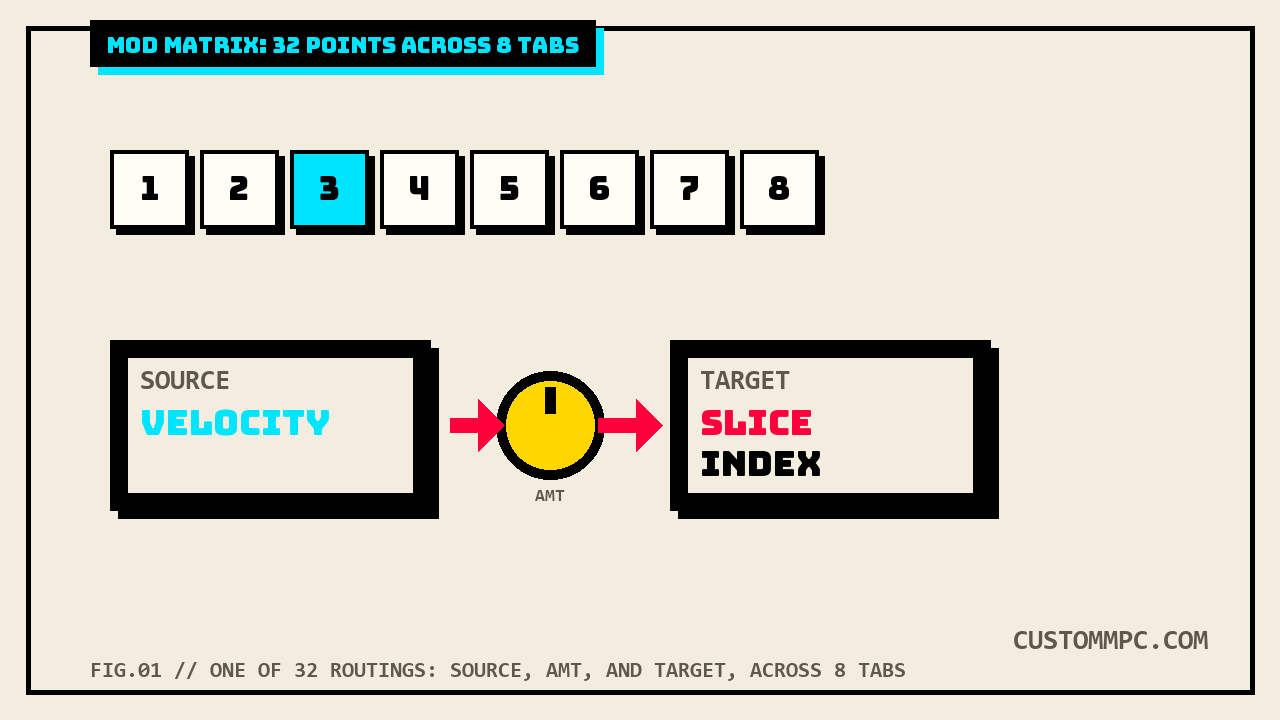
"Slice Modulation Matrix Target. You can now use the Modulation Matrix to modulate the Slice number on Drum and Keygroup tracks. This enables dynamic, performance-based slice selection using modulation input sources. For example, create a sample with 128 slices. Then, in Track Edit Mode > Drum Tracks > Mod Matrix or Track Edit Mode > Keygroup Tracks > Mod Matrix (Advanced), try assigning the Source to Velocity and the Target to Slice Index for the layer containing the sample. Each velocity value will trigger a corresponding slice, creating a detailed and expressive velocity response."
That's Source = Velocity, Target = Slice Index, on a single Mod Matrix point, and the practical result is a sample chopped into 128 pieces where how hard you hit the pad decides which slice fires, a genuinely different playing technique from the fixed velocity destinations on the Mods tab (Sample Start, Filter Cutoff, Pitch, Amp, Pan and the rest), none of which include Slice Index or anything resembling it. This is also this article's clearest concrete answer to the "what can Source and Target actually be" question the manual leaves open everywhere else, see the note below.
The Utilities fields that also feed the matrix
One tab before Mod Matrix, Utilities adds three more modulation-adjacent tools that the manual explicitly ties back into the matrix rather than treating as standalone:
"Use the Ramp Time 1/2 fields to adjust the ramp length. These can be used to apply additional modulation shaping to other parameters via the Mod Matrix. Use the Note Counter 1/2 Size fields to set stepped modulation values. These can be used as part of the Mod Matrix to change parameter values based on the number of voices selected (2-64). The Voice section allows you to add additional free running LFOs which can be used for subtle modulations in the Mod Matrix. Use the Global Drift knob to set the amount of drift applied to the entire drum track, or use the Voice Drift knob to set the amount of drift applied to the selected pad."
Three more usable Sources, in other words, beyond the two named LFOs and whatever velocity or note data a track already generates: two ramp generators, a stepped counter tied to how many voices are currently playing, and a set of slow free-running drift LFOs meant for subtle, always-on movement rather than a performed sweep. None of these three do anything on their own, the manual is explicit that each one exists specifically to be patched into a Mod Matrix point as a Source, not as a fixed-destination slider the way Mods (Modulations) works.
What Akai's manual doesn't spell out
Every quote in this article describes what each field does. None of them, in either manual version, print the actual dropdown contents of the Source, Target, Direction, or Shaper fields as a list. There's no appendix table of "every available modulation source" or "every available modulation target" anywhere in the Standalone OS User Guide's Mod Matrix sections. The single named Target this article can point to with total confidence, Slice Index, comes not from the Mod Matrix's own field description but from the separate "Updates in v3.7" changelog entry quoted above, and the single named Source, Velocity, comes from that same worked example. Treat the full Source and Target lists as something to audition directly on the hardware or in MPC Software's own dropdown menus rather than something this article invents from a manual that doesn't print them.
A correction to this site's own Live 2 vs Live 3 guide
This site's Live 2 vs Live 3 comparison mentions "the expanded modulation matrix" landing on Live 2 hardware via the free MPC 3.6 update, and its own source note states the 32-point figure "was not stated in official docs." Re-checking the same manual chapter directly for this article found the opposite: both manual versions state the point count as a flat fact, "The 32 available modulation points can be configured to add a wide variety of sound shaping tools," in the Mod Matrix section itself. That source note lives only in an internal HTML comment, not in the page's visible copy (which already read as the intentionally vague "expanded modulation matrix" and states nothing incorrect), so no visible text on that page needed a fix, but the record is corrected here per this site's own rule that conflicts between sources get stated, not silently carried forward.
Common mistakes
Mistake: opening Mods (Modulations) looking for a Target dropdown. That tab has none, every slider is permanently wired to the parameter named in its own label. A free choice of target only exists in Mod Matrix.
Mistake: expecting a Keygroup track in Legacy mode to have a Mod Matrix (Advanced) tab. That tab is Advanced-engine only. Switch the Legacy button off first.
Mistake: trying to route velocity into Slice Index from the Mods tab. Slice Index isn't one of the eight named Velocity Sensitivity destinations. It only exists as a Mod Matrix Target, per the v3.7 changelog's own worked example.
Mistake: assuming the Ramp Time, Note Counter, or Voice Drift fields do something by themselves. All three are Sources meant to be patched into a Mod Matrix point; they have no audible effect until assigned to a Target there.
A note on manual versions
Every technical claim above is checked directly against Akai's Standalone OS User Guide, Manual Version 3.9, cross-checked against Manual Version 3.7. The Drum Track Edit Mode's modulation-adjacent tabs drift by a single, flat offset across the whole sub-chapter, confirmed independently at three separate points: Mods (Modulations) opens on page 207 in v3.9 versus page 199 in v3.7, LFO opens on page 211 versus page 203, and Mod Matrix opens on page 213 versus page 205, an identical plus-8 shift all three times. The Keygroup Advanced engine's Mod Matrix (Advanced) drifts by a different, larger, and equally flat offset, page 244 in v3.9 versus page 234 in v3.7, a plus-10 shift, independently confirmed rather than assumed to match the Drum-track section's plus-8. This site's CV/Gate Tracks guide found the same pattern, several different flat offsets inside one manual depending on which sub-chapter is being checked, and this article's own two-different-offsets result extends that finding rather than contradicting it.
The Slice Modulation Matrix Target changelog entry exists only in the v3.7 manual's own "Updates in v3.7" section; a direct search of the full v3.9 extraction returns zero hits for either "Slice Modulation Matrix Target" or "Slice Index" anywhere in that document. Version changelogs on this site's local extractions are not cumulative from one manual to the next, v3.9's own "Updates in v3.9" section lists only that version's new items (MPC Oscillators, referenced in this site's Keygroup Tracks guide) and does not restate v3.7's changes. Since features documented as added are not later documented as removed anywhere in either manual, and the Mod Matrix's own field descriptions are unchanged word-for-word between versions, this article treats Slice Index as a confirmed-present Target since v3.7 rather than an uncertain one, while disclosing plainly that its only documented mention is in the older manual's changelog text, not the current one's field descriptions.
Verdict
VERDICT
Want velocity or an LFO to nudge a Filter, Pitch, Amp, or Pan you already know by name: Mods (Modulations), one slider, done. Want to route anything, velocity into slice selection, a note counter into a filter sweep, one LFO shaping a second LFO's own depth, to anything: Mod Matrix, one of 32 points across 8 tabs. On Keygroup tracks specifically: that flexible routing is Mod Matrix (Advanced), gated behind the Legacy button being switched off. Both systems draw from the same two onboard LFOs and the same velocity data, they just disagree completely on how far that modulation is allowed to reach.
Found a Mod Matrix routing worth sharing, or a Target option this article should know about? Tell us what happened.