GUIDE CV/Gate
MPC CV/gate tracks: the complete guide to controlling modular gear
CV is the one track type that never gets its own conversation, it just sits in the same bullet list as Plugin, MIDI, and Keygroup every time someone explains what an MPC track can be. That's a shame, because it's the only track type that patches directly into a modular rack, and the jack you plug into is not the same across every MPC that has one. Every field, every rear-panel jack, and the Pro Pack's paid advanced editor, checked page by page against Akai's own manual.
The short version
A CV track is one of six track types an MPC project can hold, and Akai's own one-line definition is the whole pitch in a sentence: it takes the MIDI data you'd otherwise send to a plugin or an external MIDI box and turns it into analog control voltage and gate signals a modular synth, an old drum machine, or a CV-capable sequencer can actually use. What the six-track-type summary doesn't mention, and what trips people up when they go shopping, is that not every CV-capable MPC has the same physical jack for it: some are single-signal mono jacks, some support a breakout cable for two signals off one jack, and one whole product line, the original MPC Live, doesn't have the jack at all.
DEX'S NOTE from the vintage side of the bench: none of my old machines ever had CV out, so the first time I patched a Live II into a rack I fully expected a DIN sync box or some third-party adapter to be involved. It's not. It's a normal 1/8" jack on the back doing real analog voltage, no MIDI-to-CV converter in the signal path. Took me longer to find a cable than to set it up.
What CV/Gate actually is
Akai's own glossary keeps the definitions short and puts CV and Gate side by side, since the two are almost always used together:
"CV stands for control voltage, an analog method of sending control messages to external synthesizers, drum machines, etc. CV messages are typically used in conjunction with Gate messages (CV messages determine the pitch of notes while Gate messages determine note activation and length). CV messages are sent from the CV out ports of your MPC hardware and to the CV in ports of your external device."
Split the job in two: CV is the pitch, Gate is the on/off and duration. The same glossary entry also carries a warning worth taking seriously before wiring anything up:
"Please note that each external device uses a specific control voltage range, which determines how many volts are used in each octave (e.g., 1V/oct). Be mindful of this when setting it up with the MPC software and/or controller hardware; mismatched voltage ranges can produce unusual/undesirable 're-scaling' of the octaves."
Akai's own manual doesn't publish the MPC's native voltage range or scaling anywhere in this glossary entry, only the warning that ranges vary by device. Treat that as a real gap to check against your specific synth's own documentation before assuming a 1V/oct standard just works.
The CV track: Melodic, Drum, and the port fields
Creating a CV track works the same as any other track: New Track from Main Mode, pick CV from the type list. Once it exists, the Type field decides how it behaves, and the two options are genuinely different modes, not variations on a theme:
"Use the Type field to select Melodic or Drum CV track operation. Melodic CV tracks behave the same as previous MPC versions. Drum CV tracks can be used to configure any pad to output on any CV port."
Melodic type is the single-voice, one-pitch-at-a-time mode built for playing a synth like a lead or bass line, and it unlocks five additional fields:
"When Melodic type is selected, there are five additional settings to configure for a CV track: the CV Port, the Gate Port, the modulation wheel port (Mod Wheel Port), Velocity Port and Note Priority."
Drum type flips the model entirely: instead of one melodic voice routed through a fixed set of ports, every pad on the track gets its own independent CV destination, which is the mode built for triggering multiple analog drum voices, or multiple monophonic synths, from one set of 16 pads:
"When Drum type is selected, tap the Edit Map button to assign each pad to a specific CV port and data type."
Underneath either type, a CV track still carries the same MIDI routing fields every track type gets, because the CV signal is generated from MIDI data the track receives first:
"Use the MIDI Routing fields to edit the MIDI routing for the track: MIDI Input Port... MIDI Input Channel... MIDI Send: Sets where the MIDI data is sent. You can use this to send the MIDI data from one track to another track."
That MIDI Send field is worth flagging on its own: it means a CV track can forward its incoming MIDI data to another track at the same time it's converting that data to voltage, useful for layering an internal plugin sound underneath the same performance driving an external analog synth.
Track Edit Mode and the mixer overview
Track Edit Mode's own CV Tracks page restates Monitor and adds a few more fields specific to how the track plays back:
"Use the Length field to set how long the track is in beats... Use the Velocity field to set how loudly or quietly a track plays relative to its recorded levels... Use the Transpose field to set the transposition (in semitones) of the entire track... When the CV track type is set to Melodic, tap the Pad Perform icon to open the Pad Perform window, where you can adjust what notes or chords are played by the pads on your MPC hardware."
That last line is a genuine, useful cross-reference: a Melodic-type CV track can borrow the Pad Perform window (scales, chords, root note) this site has already covered separately, meaning the same 16 pads that trigger internal drum sounds elsewhere in a project can also play chords out to an external analog synth on a CV track. Zoom out to the Channel Mixer and the CV track's own entry is deliberately minimal, because there's no audio signal to level-adjust:
"For CV tracks, you will see an overview of all available CV outputs with a slider for each. Use the sliders to set the value of each parameter."
No pan, no insert-effect slots, no send levels, the Mixer view for a CV track is just direct access to whatever CV/Gate outputs are in play, one slider per port.
Which hardware actually has the jack
A CV track exists as a software track type on every current MPC, but sending it anywhere requires a physical CV/Gate jack on the back of the unit, and that part is not universal. Akai's own manual documents the connector, model by model, and one product is a genuine trap:
"CV/Gate Out: Use standard 1/8" (3.5 mm) TS cables to connect these outputs to optional external sequencers. MPC X will send control voltage (CV) and/or Gate data over this connection."
MPC X has it. So does MPC Live II, MPC One, MPC One G2, MPC Key 61, MPC Key 37, and MPC Key 37 G2, all seven confirmed with their own rear-panel CV/Gate item in the manual. The original MPC Live is the odd one out, and it's not a documentation gap, it's a confirmed absence: its full 17-item rear panel list, power input through Kensington lock slot, never mentions CV or Gate once, in either manual version checked.
"1. Power Input... 2. Power Switch... 3. Charging Indicator... 4. USB-B Port... 5. USB-A Ports... 6. SD Card Slot... 7. Rec Vol... 8. Master Vol... 9. Inputs (1/4" / 6.35 mm)... 10. Inputs (RCA)... 11. Line/Phono Switch... 12. Grounding Terminal... 13. Outputs (1/4" / 6.35 mm)... 14. Phones (1/8" / 3.5 mm)... 15. MIDI In... 16. MIDI Out... 17. Kensington Lock Slot."
The original Live's direct successor, Live II, added the jack. If the plan for a used-market purchase involves patching into a modular rack, "Live" and "Live II" are not interchangeable the way the names suggest.
The TS-vs-TRS split: one signal or two
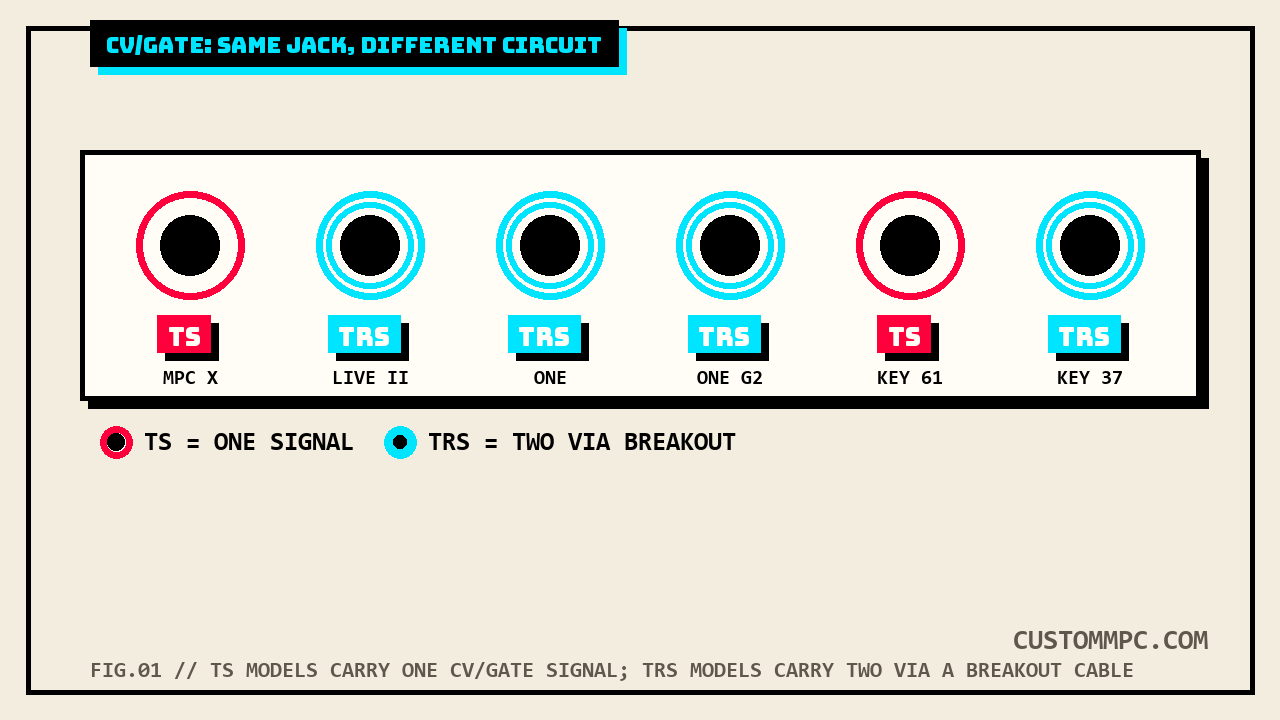
Even among the seven models that do have the jack, the connector itself isn't identical. MPC Key 61 and MPC Key 37 sit right next to each other in the lineup and get explicitly different labels in the same manual:
"12. CV/Gate Out (1/8" / 3.5 mm, TS): MPC Key 61 will send control voltage (CV) and/or Gate signals over these outputs to optional external synths or sequencers. Use standard 1/8" (3.5 mm) TS cables to send a single CV/Gate signal per output."
"12. CV/Gate Outs (1/8" / 3.5 mm, TRS): MPC Key 37 will send control voltage (CV) and/or Gate signals over these outputs to optional external sequencers. Use standard 1/8" (3.5 mm) TS cables to send a single CV/Gate signal per output, or use a stereo TRS-to-dual mono TSF breakout cable (such as a Hosa YMM-261) to send two CV/Gate signals per output."
Key 61's jack is TS, mono, one signal, full stop. Key 37's jack is TRS, and that extra ring on the plug is exactly what makes the breakout-cable trick possible, splitting one physical jack into two independent CV/Gate signals with the right cable. MPC X and Key 61 share the TS-only, no-breakout wording; MPC Live II, MPC One, MPC One G2, MPC Key 37, and MPC Key 37 G2 all carry the TRS/breakout-capable wording, even where the manual doesn't spell out "TRS" in the item's own parenthetical for every one of them. Practically: on a Live II, One, One G2, Key 37, or Key 37 G2, the right breakout cable turns one CV/Gate jack into two independent CV/Gate outs; on an X or a Key 61, it doesn't, that jack is one signal and there's no cable trick around it.
The Pro Pack's Advanced CV Track Edit
Everything above is available on a stock CV track. The MPC Pro Pack, a paid add-on, opens a dedicated editing window most CV-track users likely never see:
"The MPC Pro Pack includes an advanced CV track editing playground, with a comprehensive set of modulators and utilities to greatly enhance control over CV-enabled devices."
It's built around six tabs. Routing sets where each CV Out points and its output voltage; Env 1-4 gives four full ADSR-style envelopes with Note On/Loop/One Shot trigger modes and sequence sync; LFO 1-4 gives four low-frequency oscillators with seven waveform types (Ramp Up, Ramp Down, Triangle, Sine, Square, Random 1, Random 2) and tempo-synced rate options; Stepper builds a step sequence for CV control with per-step smoothing; Utilities adds ramp generators and a clock divider for slower modulation rates; and Matrix lets you sum or multiply multiple modulation sources into one signal. It's the difference between a CV track that plays a fixed pitch and one that's actively modulating a filter cutoff or a VCA on the receiving synth in real time, generated entirely inside the MPC rather than patched from an external modulation source.
One more cross-reference worth knowing about, buried in an entirely different part of the manual: Q-Link Edit Mode's Envelope Follower/LFO tab, which turns an audio signal into a sidechain-style control source, explicitly restricts two of its own destination options to CV tracks and their MIDI-track siblings:
"Use the selector below the Envelope Source field to set where the envelope is applied: Input: The envelope is applied at the audio input source. This option is only available for MIDI and CV tracks... Playback: The envelope is applied on playback of the selected track. This option is only available for MIDI and CV tracks."
That's a genuine second modulation path into a CV track's output, separate from the Advanced CV Track Edit window entirely, and it only surfaces if you already know to look for it in Q-Link Edit Mode rather than the CV Tracks chapter.
Common mistakes
Mistake: buying a used original MPC Live expecting CV output. It doesn't have the jack, confirmed by its full rear-panel list in both manual versions checked. Live II added it.
Mistake: assuming a breakout cable will turn any CV/Gate jack into two signals. Only works on the TRS-labeled jacks (Live II, One, One G2, Key 37, Key 37 G2). MPC X and Key 61 are TS-only, one signal per jack, no cable around it.
Mistake: setting up a synth's CV input without checking its own voltage-per-octave spec first. Akai's own glossary flags mismatched ranges as a real, documented problem, but doesn't publish the MPC's own native scaling, so that check has to happen against the receiving device's documentation.
Mistake: expecting a Drum-type CV track to behave like a Melodic one. Drum type maps individual pads to individual CV ports for multi-voice or multi-drum control; Melodic type is a single voice through a fixed CV/Gate/Mod Wheel/Velocity port set. Picking the wrong Type field for the job means reconfiguring the whole track.
A note on manual versions
Every technical claim above is checked directly against Akai's Standalone OS User Guide, Manual Version 3.9, cross-checked against Manual Version 3.7. The CV Tracks chapter's three sections drift by three different amounts between versions, +4 pages for the Main Mode settings (v3.9 p.55 vs. v3.7 p.51), +5 for the Track Edit Mode page (p.123 vs. p.118), and +10 for the Channel Mixer overview (p.256 vs. p.246), each confirmed via direct per-page extraction with the body text diffed word-for-word identical after stripping page-number headers. The hardware rear-panel items split into two different flat offsets in the same manual: MPC X, MPC Live, MPC Live II, and MPC One all drift +10 pages (v3.9 p.350/353/357/361 vs. v3.7 p.340/343/347/351), while MPC Key 61 and MPC Key 37 drift +15 (v3.9 p.372/377 vs. v3.7 p.357/362). MPC One G2 and MPC Key 37 G2 don't exist anywhere in v3.7, both devices postdate that manual entirely, confirmed by a full-text search returning zero hits for either model name. The Advanced CV Track Edit chapter drifts furthest of all, +30 pages (v3.9 p.503 vs. v3.7 p.473), with its own content, Routing/Env/LFO/Stepper/Utilities tabs, word-for-word identical between versions once the page-number lines are stripped out. Five different offsets inside one manual, each checked individually rather than assumed from a single earlier finding elsewhere.
Verdict
VERDICT
Want to sequence a modular synth or an old analog drum machine from an MPC: add a CV track, pick Melodic for one voice or Drum to map pads to ports, and set the routing fields. Buying used and CV output matters: confirm the model isn't the original MPC Live, it's the one current-ish MPC with no CV/Gate jack at all. Need two independent CV signals off one jack: that only works on the TRS-labeled models (Live II, One, One G2, Key 37, Key 37 G2) with a breakout cable, not on MPC X or Key 61. Want the CV output actually modulating over time instead of holding a fixed value: that's the Pro Pack's Advanced CV Track Edit window, envelopes, LFOs, a stepper, and a modulation matrix, a paid feature most stock CV-track users never open.
Running an MPC CV track into a modular rack or an old analog voice, and found a routing trick worth sharing? Tell us what happened.