GUIDE EFFECTS SYSTEM
MPC insert vs send/return effects: how the signal actually routes
This site has covered individual effects before, XYFX Mode as its own touchscreen mode, the eight bundled AIR instrument plugins, but never the routing system underneath all of it. Every MPC running the Standalone OS has two completely different ways to apply the same shared catalog of effects: Insert, which processes one single point in the signal path, and Send/Return, which shares one processed bus across multiple sources at once. Same 98-effect catalog either way. Here's how the two systems actually differ, straight from Akai's own manual, plus a full count of that catalog and a real classification quirk inside it.
The short version
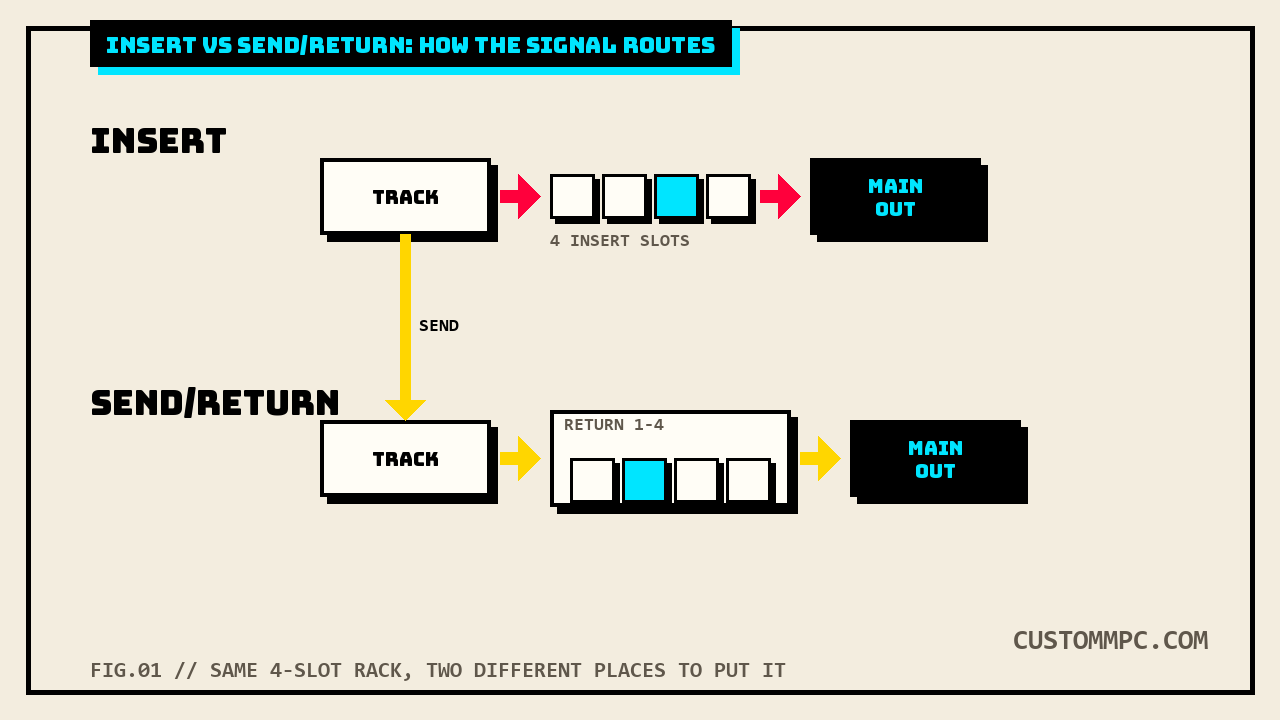
Insert Effects sit directly in one signal path, a specific pad, keygroup, track, submix, or output, and process only that source. Each of those locations gets its own bank of up to four insert slots. Send/Return Effects work differently: a pad, keygroup, track, or submix sends a copy of its audio at an adjustable level to one of up to four shared return buses, and that return's own four insert slots process everything routed to it before the result reaches a main output, the classic one-reverb-many-sources pattern. Both systems draw from the exact same shared catalog, 98 individual effects across 6 categories, and both cap out at four active slots per location. Three modes handle effects outside this pattern entirely: the Sampler and Looper bake insert effects permanently into whatever they record, and XYFX Mode is itself just a specific insert effect loaded into one of a track's four slots, not a separate system.
RIO'S NOTE: The question I get most is "should I put reverb on the insert or the send." If it's one drum in the kit, sure, insert it directly and move on. The second you want the snare and the vocal chop sharing the exact same room sound, that's what a return is for. One reverb instance, two sources, same tail. Don't load the same plugin twice when the whole point of a bus is not having to.
Insert Effects
Insert Effects can load onto six different location types: individual Pads, individual Keygroups, entire Tracks (Drum, Keygroup, Plugin, or Audio type), Submixes 1 through 8, and the stereo Outputs pairs (1/2 or 3/4). Every one of those locations gets the same four-slot cap, no location type gets more or fewer insert slots than another. Applying an effect to a single pad or keygroup keeps it isolated to that one sound, a vocal chop in a drum kit, or one melodic section of a keygroup program. Applying it to the whole track instead makes every sound on that track share the identical effect. Akai's own manual specifically calls out submix routing as the way to get both: route several pads or tracks into one submix and insert the effect there, one instance covering exactly the sources you routed to it, not the whole track and not just one pad. Output inserts get their own specific use case named directly in the manual: mastering effects like a limiter, applied to the final stereo pair rather than any individual source.
Where you load an insert
The same insert-slot system shows up in three different screens depending on what you're editing: Main Mode's channel strips (tap the FX header, then an empty slot marked with a plus sign), the Pad Mixer or Channel Mixer's dedicated Effects tab, and Track Edit Mode's own Effects tab. All three land on the identical Inserts window once opened, load, reorder, edit, enable/disable, or clear a slot, and a factory or user FX rack can load all four slots at once from a saved preset. Every insert slot also carries its own On/Off toggle plus a single All On/All Off switch for the whole bank of four, useful for A/B-ing a chain without clearing anything.
Send/Return Effects
A return isn't a separate kind of effect, it's just another four-slot insert bank, fed by a send level instead of sitting directly in one source's path. Up to four return buses exist (Return 1 through 4), each one accessed as its own channel in Main Mode's Track field or the Channel Mixer, right alongside the Submixes and Main Outputs. Setting how much of a pad, keygroup, or track feeds a given return is a separate control from the insert system entirely, a dedicated Send knob per return, adjustable from Main Mode, Track Edit Mode, or the Pad Mixer's own Sends tab, distinct from that same source's insert-effect controls in the same screens. Mixdown behavior splits along the same insert/return line: bouncing a pair of main outputs lets you choose whether main insert effects are included, bouncing separate tracks lets you choose whether send/return effects are included, two independent toggles, not one shared setting for both effect types.
Three modes that break the pattern
Akai's own manual names three modes that manage effects outside the normal insert/send-return split entirely. The Sampler and the Looper each apply up to four insert effects live, as audio is being recorded, and once that recording finishes the effect is permanently part of the sound, not a removable insert slot anymore. XYFX Mode is the third: this site's own XYFX Mode guide already established that XYFX behaves like a single insert effect rather than a separate performance layer, and this chapter's own text confirms it from the opposite direction, "XYFX is the name of the insert effect you have to load to the track before you can use this mode," meaning it occupies one of that track's four regular insert slots like any other effect, it just happens to expose a touchscreen XY pad once it's loaded.
TouchFX vs XYFX
Easy to confuse with XYFX, and the manual flags the distinction directly: TouchFX is a separate effect built specifically for MPC Key 61's touch strip controller, one-dimensional rather than XYFX's two-axis pad, though it can still be triggered on any MPC hardware via the onscreen touch slider or an external MIDI device. Both TouchFX and XYFX are, per Akai's own effects list, ordinary entries in the catalog below, not a separate tier of "performance effects," which is exactly the classification quirk covered next.
The 98-effect catalog
Every insert or send/return slot, regardless of location, pulls from the same shared list: 98 individual effects split across 6 categories in Akai's own Effects & Parameters appendix.
| Category | Count | A few named examples |
|---|---|---|
| Delay/Reverb | 23 | AIR Reverb, AIR Spring Reverb, Delay Ping Pong, Delay Tape Sync, Reverb Large |
| Dynamics | 14 | AIR Channel Strip, AIR Compressor, AIR Limiter, Bus Compressor, Mother Ducker |
| EQ/Filter | 17 | AIR Para EQ, AIR Vintage Filter, HP Filter Sweep, PEQ 4-Band |
| Harmonic | 19 | AIR Amp Sim, AIR Distortion, Decimator, Granulator, TouchFX, XYFX |
| Modulation | 22 | AIR Chorus, AIR Phaser, Autopan Sync, Flanger, Tremolo |
| Vocal | 3 | AIR Vocal Doubler, AIR Vocal Harmonizer, AIR Vocal Tuner |
Akai's own appendix opens with a disclaimer that some effects "are not included with MPC and are available for purchase from thempcstore.com," marked with an asterisk next to the name. A direct scan of all 98 names in this specific manual version turns up zero asterisks anywhere in the catalog, every single one of these 98 effects ships included as of v3.9, none of them currently gated behind a separate thempcstore.com purchase.
A classification quirk
TouchFX and XYFX are both touchscreen performance controllers, not audio-processing algorithms in the usual sense, a pitch shifter or an amp simulator changes the sound on its own, TouchFX and XYFX exist to give you a hands-on control surface over whatever's already loaded underneath them. Akai's own appendix files both of them under Harmonic anyway, the same category as AIR Amp Sim, AIR Distortion, and Decimator, with no separate "performance" or "touch control" category anywhere in the six-category list.
A version note
The Effects overview chapter and the Insert/Send-Return workflow pages carry the same flat offset this site keeps finding across the manual: a straight +5 pages between v3.7 and v3.9 (Effects opens at p.83 in v3.7, p.88 in v3.9), and a direct line-by-line diff of five separate pages across that span turned up zero content differences, every instruction, button name, and note word for word identical between versions. The Effects & Parameters appendix carries a much larger but equally flat offset, +21 pages across all six categories (Delay/Reverb 367 to 388, Dynamics 375 to 396, EQ/Filter 379 to 400, Harmonic 385 to 406, Modulation 394 to 415, Vocal 399 to 420), and every one of those six "Options:" lines matches word for word between versions, the identical 98 effect names in the identical order, confirming the entire appendix carried forward unchanged and the +21 gap is earlier-chapter growth elsewhere in the book, not new effects added in v3.9.
Common mistakes
Mistake: thinking a return is a special effect type. It's the same four-slot insert bank every other location gets, just fed by a send level instead of sitting directly in one source's path.
Mistake: loading the same reverb on five separate tracks instead of one send. That's exactly the case Send/Return exists for, one processed bus, multiple sources sharing the identical tail, instead of five separate insert instances eating five separate slots across five different locations.
Mistake: assuming Sampler or Looper effects can be tweaked later. Both bake up to four insert effects directly into the recorded audio; once that take is captured, the effect is part of the sound, not a slot you can reopen and adjust.
Mistake: expecting XYFX to sit outside the normal insert-slot count. It doesn't, loading XYFX fills one of that track's four regular insert slots exactly like any other effect on the list.
A note on sources
Rule two on this site is that conflicts get stated, not quietly resolved, and the thempcstore.com asterisk disclaimer is exactly that kind of case: Akai's own text still warns that some effects require a separate purchase, but a direct scan of every effect name in this specific manual version finds none marked that way. Rather than deleting the disclaimer's relevance or claiming it never applies, this article states plainly what's checkable right now, zero of 98, and flags that the wording's continued presence suggests it may describe an earlier catalog state this version's list has moved past.
The Harmonic category's inclusion of TouchFX and XYFX is presented above as a classification choice worth noting, not a documentation error. Akai's own appendix simply doesn't have a category built for touch-control performance effects, and this article isn't asserting that it should, only that the current placement is easy to miss if you go looking for either effect under a category name that doesn't exist.
Verdict
VERDICT
The systems: Insert processes one location directly, pad, keygroup, track, submix, or output, each with its own four slots; Send/Return shares one processed bus, up to four returns, across as many sources as you route to it, at an independently adjustable send level. The catalog: both draw from the same 98 effects across 6 categories, and as of this manual version every single one ships included, none gated behind thempcstore.com despite the appendix's own lingering disclaimer. The takeaway: reach for Insert when one sound needs its own unique chain, reach for Send/Return the moment two or more sources should share the exact same processed tail, and remember that XYFX isn't a third system, it's one specific insert effect wearing a touchscreen.
Found a routing detail this guide should have caught? Tell us what happened.