GUIDE Pad Response
MPC pad response: Threshold, Sensitivity, and Curve, explained
Three settings on one screen shape how every pad on a current-lineup MPC feels under your fingers, and they're easy to confuse with each other because their names sound like they'd do the same job. They don't. One decides whether a hit registers at all, one scales how hard equals loud, and one bends the whole response curve. Checked page-by-page against Akai's own manual, with a real look back at what the MPC1000 called the same idea twenty years earlier.
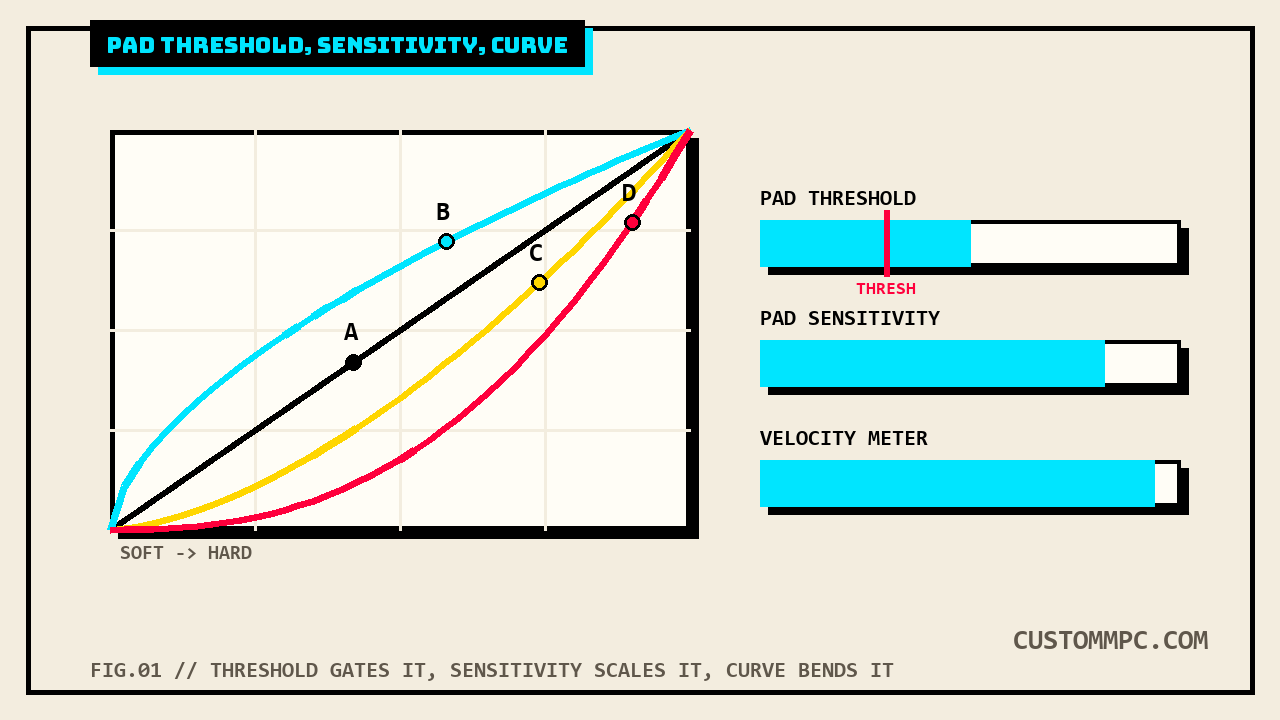
The short version
Akai's manual puts all three settings on the same screen, one sentence apiece, no shared name to tie them together beyond the "Pad" prefix:
"Pad Threshold: This determines how much force is required to strike the pads for them to trigger. Pad Sensitivity: This determines how the pads respond to touch. At lower values, you need to use more force to generate a high-velocity note. At higher values, it is easier to generate high-velocity notes, even if you do not use much force while pressing a pad. Pad Curve: This determines how striking the pads translates into velocity values. The A curve is essentially linear, while the B, C, and D curves are exponential (see graphic here)."
Three different jobs. Threshold is a gate: below it, a pad doesn't sound at all, full stop. Sensitivity is a scale: it stretches or compresses how much of your available force range maps to velocity 1-127. Curve is a shape: it decides whether that scaling happens evenly across the range or piles up toward the soft or hard end. Get any one of them wrong and the others can't fix it, they're solving different problems.
SAM'S NOTE from the bench: I spent longer than I'll admit turning up Sensitivity to fix pads that felt "dead," when the actual problem was Threshold set high enough that my normal playing force wasn't clearing the gate. Sensitivity can't rescue a hit that never registered. If a pad feels unresponsive at low velocities specifically, check Threshold first, not Sensitivity.
Where this lives: Preferences > Hardware
All three settings sit on one screen, opened the same way as every other Preferences tab:
"The settings on this screen determine the behavior of your MPC hardware's pads and touchscreen."
That's the Hardware tab's own one-line mission statement, and pad feel is only part of what it covers, the same tab also holds touchscreen brightness, footswitch behavior, and several unrelated global settings this article deliberately skips (see the scope note below). Nothing in the extracted manual text suggests these three fields are adjustable per pad on current-lineup hardware, no step here says "select the pad you want to adjust" the way an older calibration workflow does. They read as whole-unit settings: one Threshold, one Sensitivity, one Curve, applied to all sixteen pads at once.
Pad Threshold: the trigger floor
Threshold is the simplest of the three and the one most often skipped over, because it isn't about tone or feel, it's a binary gate:
"Pad Threshold: This determines how much force is required to strike the pads for them to trigger."
One sentence, and the manual doesn't elaborate further on this field specifically, no worked example the way it does for Sensitivity below. Read plainly, this is the floor a hit must clear before it becomes a note at all, set it too high and light finger-drumming or ghost notes on brushed hi-hats won't sound; set it too low and the pad may fire from vibration or an adjacent hard hit bleeding through the chassis, a false trigger rather than a real one.
Pad Sensitivity: how hard is loud
Sensitivity is the field that gets the manual's own worked explanation, because it's the one most players actually mean when they say a pad "feels wrong":
"Pad Sensitivity: This determines how the pads respond to touch. At lower values, you need to use more force to generate a high-velocity note. At higher values, it is easier to generate high-velocity notes, even if you do not use much force while pressing a pad."
Once a hit has already cleared the Threshold gate, Sensitivity decides how much of your playing force turns into velocity 127. A finger drummer who never hits hard wants Sensitivity turned up, so a moderate tap still reaches full velocity. A stick player coming from an acoustic kit, used to real dynamic range, often wants it turned down, so their hardest hits don't all pin at 127 and flatten the dynamics they're trying to play.
Pad Curve: A through D
Curve is the shape layered on top of both of the above, and it's the one setting here Akai's manual admits it can't fully explain in text alone:
"Pad Curve: This determines how striking the pads translates into velocity values. The A curve is essentially linear, while the B, C, and D curves are exponential (see graphic here)."
Read plainly against that description: A is a straight line from soft to loud, equal force increases produce equal velocity increases across the whole range. B, C, and D bend that line, and "exponential" without a printed exponent value means the practical difference between them is something to feel out by ear rather than calculate, Akai's own text doesn't hand over the curve's underlying formula. Framed against common drum-machine convention (which the manual doesn't state outright, so treat this sentence as this site's own inference, not a quoted claim): a curve that compresses the low end pushes soft-to-medium hits toward higher velocities faster, useful for someone whose hands don't generate much dynamic range on the pads; a curve that does the opposite makes the top of the range harder to reach, useful for someone who tends to hit too hard and wants more headroom before pinning 127.
Reading the Velocity and Aftertouch meters
The same screen includes a pair of live meters built specifically to make Threshold and Sensitivity adjustments visible instead of guessed:
"Velocity & Aftertouch: View these meters when striking and pressing the pads to help gauge the force and pressure you are applying to them. These meters are useful when adjusting the Pad Threshold and Pad Sensitivity parameters (above)."
Notice the manual names these meters as the intended tuning method for Threshold and Sensitivity specifically, not for Curve, whose effect is better judged by playing normally and listening than by watching a needle. The practical order that falls out of the manual's own structure: strike a pad at the softest touch you want to register, watch the Velocity meter to confirm it clears Threshold and reads a sensible low number; strike your hardest realistic hit and confirm Sensitivity lets it reach something close to 127 without every hit pinning there; only then move to Curve, and judge that one by feel across a real pattern, not by staring at the meter.
Same tab, not covered here
The Hardware tab holds several other fields this article isn't unpacking, because they're not pad-feel settings and deserve their own separate treatment rather than a rushed paragraph each: Pad Brightness and Battery Brightness Factor (screen and pad LED brightness, MPC Live/Live II battery-specific), Footswitch 1 & Footswitch 2 (MPC X/X SE only), Battery Power & Wall Power Dimming and Brightness (touchscreen power management), Bank Button Press (Select A-D versus Select/toggle bank behavior), Shift + Q-Link Press, Global Pitch Bend range, VU Meter Source (MPC X/X SE only), and Date/Time/Time Zone/USB Type-C role fields (the latter two G2-only). All confirmed present on the same tab, none of them shape how a pad responds to a hit, which is the one thing this article set out to cover.
Not the same as: the MPC1000's own calibration screen
This site's own pad repair and calibration article already documents a real, Akai-published calibration procedure on the MPC1000, twenty-one years before the current OS's Hardware tab existed. Checked directly against that manual rather than taken on the earlier article's word:
"You should set the Pad sensitivity number to 1 (Minimum), and increase the Pad sensitivity number while hitting the Pad until the velocity number at the right displays 127 when you hit the Pad with the strength you wish to use to get Velocity 127... The velocity curve maps the strength of hitting the Pad to MIDI velocity data. If the Velocity response is not enough even with a range hard/soft Pad hits, try switching the velocity curve from A-B-C-D."
Two real differences worth naming, checked directly rather than assumed. First, the MPC1000's field is explicitly per-pad, its own procedure opens with "Select the Pad you wish to adjust... by hitting it," a step with no equivalent described anywhere in the current OS's Hardware tab text, which reads as a single whole-unit setting for all sixteen pads. Second, and more interesting: the MPC1000 in 2005 only exposed one Sensitivity number plus a Velocity curve, no separate Threshold field at all, meaning the current OS's Threshold/Sensitivity split didn't exist yet, sensitivity alone was doing both jobs. What's genuinely unchanged across two decades and completely different hardware and software generations is the letter scheme itself: A-B-C-D labeled the MPC1000's Velocity curve in 2005, and the exact same four letters label Pad Curve on current-lineup hardware today, confirmed identical in both manuals' own text.
Common mistakes
Mistake: raising Sensitivity to fix pads that don't register soft hits. If a hit isn't sounding at all, that's Threshold, not Sensitivity, raising Sensitivity only changes velocity scaling on hits that already cleared the trigger floor.
Mistake: expecting a printed formula for the B, C, and D curves. Akai's own manual calls them "exponential" and points to a graphic rather than stating the underlying math in text; treat the letter choice as something to judge by ear against a real pattern, not a value to calculate.
Mistake: looking for a per-pad version of these three settings on current hardware. Nothing in the manual's Hardware tab text describes selecting an individual pad before adjusting Threshold, Sensitivity, or Curve, unlike the MPC1000's own explicit per-pad procedure from 2005.
A note on manual versions
Every technical claim above is checked directly against Akai's Standalone OS User Guide, Manual Version 3.9, cross-checked line-for-line against Manual Version 3.7, which carries the identical wording for Pad Brightness, Battery Brightness Factor, Pad Threshold, Pad Sensitivity, Pad Curve, and Velocity & Aftertouch, no rewording between editions. The chapter sits at a different printed page in each: v3.9's Hardware tab content runs on page 64, immediately preceding Sequencer on page 65; v3.7's equivalent content runs on page 60, preceding its own Sequencer section on page 61, both confirmed directly against each manual's own page-footer numbers rather than inferred from the table of contents alone. That's a flat plus-four offset (64 minus 60, and 65 minus 61 both equal four), matching the same flat plus-four offset already visible in each manual's own table of contents entry for the Preferences chapter as a whole (v3.9 page 61, v3.7 page 57). A distinct offset value from the plus-five found elsewhere in this same manual by this site's Touch Strip coverage and the larger offsets found in other chapters, one more confirmed data point that this manual's page drift between versions isn't one single number applied everywhere, it varies by chapter.
Verdict
VERDICT
Pads not registering soft hits: that's Threshold, lower it, don't touch Sensitivity first. Hits all pinning to max velocity, or never reaching it: that's Sensitivity, watch the Velocity meter while you adjust. Response feels technically correct but wrong under your hands: that's Curve, cycle A through D while playing a real pattern, not a single test hit. Want per-pad calibration instead of one whole-unit setting: that's not what this screen offers on current hardware, per Akai's own text; that granularity is documented on the MPC1000's own 2005-era calibration screen instead.
Found a Curve letter that actually nailed your playing style, or a Threshold value that killed false triggers without losing your ghost notes? Tell us what happened.